
How to Fix Duplicate Content Issues?
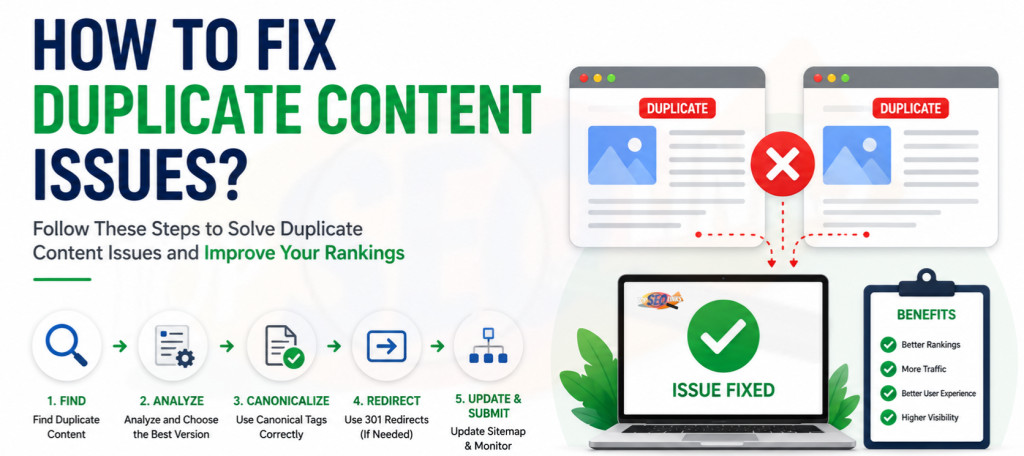
How to fix duplicate content issues is an important question for every website owner because duplicate content can confuse search engines and reduce your SEO performance. Duplicate content means the same or very similar content appears on more than one URL. This can happen on your own website or across different websites. When search engines find many similar pages, they may not know which page should rank higher. That is why fixing duplicate content is important for better rankings, cleaner website structure, and improved user experience.
At Topseolinks.com, we help businesses find and fix duplicate content problems with proper SEO audits, canonical tags, redirects, content improvement, and technical SEO support.
Want to improve your website SEO without confusion? Start with our special offer: Free SEO for 1st Month
What Are Duplicate Content Issues?
Duplicate content issues happen when two or more pages have the same or almost the same content. Search engines want to show the best page to users. But when many pages look the same, search engines may not know which one is the original or most useful page.
For example, these URLs may show the same content:
- example.com/shoes
- example.com/shoes/
- example.com/shoes?color=black
- www.example.com/shoes
- example.com/shoes/index.html
To a person, these may look like the same page. But to search engines, they can look like different URLs. If all of them show the same content, duplicate content can happen.
Duplicate content can also happen when:
- The same blog is published on different pages
- Product descriptions are copied from suppliers
- Category pages have very similar text
- Printer-friendly pages are indexed
- HTTP and HTTPS versions are both available
- WWW and non-WWW versions both open
- URL parameters create many versions of the same page
- Old pages are not redirected after a website redesign
- Pages are copied from other websites
Duplicate content is not only about copied words. It can also be about duplicate URLs, duplicate titles, duplicate meta descriptions, and duplicate product pages.
Why Duplicate Content Is Bad for SEO
Duplicate content can hurt SEO because it makes your website harder to understand. Search engines crawl websites to find pages, understand them, and decide which ones should appear in search results. When many pages look the same, search engines may spend time crawling duplicate pages instead of important pages.
Google explains that canonicalization is the process of choosing the main representative URL from duplicate pages. This means Google may choose a page by itself if your website does not give clear signals.
Here are the main SEO problems caused by duplicate content:
1. Search Engines May Rank the Wrong Page
You may want one page to rank, but Google may choose another similar page. For example, you may want your main service page to rank, but Google may rank a filtered URL, old page, or duplicate version instead.
This can reduce clicks, leads, and conversions.
2. Ranking Power Can Get Split
When duplicate pages exist, backlinks and internal links may point to different versions of the same content. This can split SEO value between pages.
For example:
- Some links point to /seo-services
- Some links point to /seo-services/
- Some links point to /seo-services?source=ad
Instead of one strong page, you may end up with many weak versions.
3. Crawl Budget Can Be Wasted
Search engines have limited time to crawl a website. If your website has many duplicate URLs, Googlebot may waste time crawling pages that do not matter.
This is a bigger issue for large websites, ecommerce stores, news websites, and websites with filters.
4. Users May Get Confused
Duplicate content can also confuse visitors. If they see the same information on many pages, they may not know which page is correct. This can reduce trust.
5. Your Content Quality May Look Weak
If your website has many pages with repeated or copied content, search engines may see your site as less useful. A website should offer clear, original, and helpful information.
For better basic understanding, you can also read What is Duplicate Content?
Common Causes of Duplicate Content
Duplicate content can happen for many reasons. Sometimes it is caused by technical settings. Sometimes it happens because content is copied or repeated. Many website owners do not even know duplicate pages exist.
| Cause of Duplicate Content | Simple Meaning | Example | Best Fix |
|---|---|---|---|
| HTTP and HTTPS versions | Both secure and non-secure pages open | http://site.com/page and https://site.com/page | Use 301 redirect to HTTPS |
| WWW and non-WWW versions | Both website versions open | www.site.com and site.com | Choose one version and redirect |
| URL parameters | Filters or tracking create extra URLs | ?color=red or ?utm_source=email | Use canonical tags or parameter control |
| Copied product descriptions | Same supplier text used by many websites | Same product text on many stores | Write unique product content |
| Similar category pages | Many pages have almost same text | “Red Shoes” and “Blue Shoes” pages | Add unique helpful content |
| Pagination issues | Multiple pages have repeated content | page/1, page/2, page/3 | Improve structure and internal linking |
| Printer pages | Print versions get indexed | /print-page | Use canonical or noindex |
| Old URLs after redesign | Old and new pages both exist | /old-service and /new-service | Use 301 redirects |
How to Find Duplicate Content Issues
Before you fix duplicate content, you need to find it. You cannot fix what you do not know.
Duplicate content can hide in many places. It may be in your blog posts, product pages, category pages, landing pages, tags, archives, or technical URLs.
Use Google Search Console
Google Search Console can show duplicate page problems. You may see messages like:
- Duplicate without user-selected canonical
- Duplicate, Google chose different canonical than user
- Alternate page with proper canonical tag
- Duplicate, submitted URL not selected as canonical
These reports help you understand which pages Google sees as duplicates.
Google also recommends using the URL Inspection tool to check which page Google considers canonical. Even if you set a canonical page, Google may choose a different one if its systems think another page is better for users.
Search Your Website Manually
You can manually search parts of your content in Google. Copy one sentence from your page and search it in quotation marks.
Example:
“best handmade leather shoes for daily office use”
If many pages show the same sentence, you may have duplicate content.
Check Indexed Pages
Search this in Google:
site:yourwebsite.com
This helps you see which pages are indexed. You may find:
- Old pages
- Tag pages
- Category pages
- Duplicate product pages
- Test pages
- Parameter URLs
- Search result pages
Use SEO Audit Tools
SEO tools can find duplicate title tags, duplicate meta descriptions, duplicate H1 tags, duplicate pages, canonical errors, and redirect problems.
At Topseolinks.com, we use proper website audits to check technical SEO, content quality, URLs, canonical tags, redirects, indexability, and site structure. Our SEO Services help businesses find hidden duplicate content problems and fix them correctly.
How to Fix Duplicate Content Issues Step by Step
Fixing duplicate content is not about deleting everything. It is about choosing the best page, guiding search engines clearly, and making your content more useful.
Step 1: Choose the Main Version of Each Page
First, decide which page should be the main page.
This main page is called the canonical page. It is the version you want search engines to index and rank.
Ask these questions:
- Which page is most useful for users?
- Which page has the best content?
- Which page gets the most traffic?
- Which page has backlinks?
- Which page matches the main keyword?
- Which page should appear in Google?
Once you choose the main page, all duplicate versions should point to it using canonical tags or redirects.
Step 2: Use Canonical Tags
A canonical tag tells search engines which URL is the main version of a page. It is added in the head section of the HTML page.
Google says the rel=”canonical” link annotation is a preferred way to tell Google your canonical URL. Google also recommends linking internally to the canonical URL instead of duplicate URLs.
Simple example:
<link rel="canonical" href="https://example.com/main-page/" />This tells search engines:
“This page may be similar to another page, but please treat this URL as the main one.”
Canonical tags are useful when:
- You need to keep duplicate pages live
- Products appear in many categories
- URL filters create similar pages
- Tracking URLs are used
- Printable pages exist
- Similar pages are useful for users but not all should rank
For more learning, read What is Canonical Tag?
Step 3: Use 301 Redirects
A 301 redirect sends users and search engines from one URL to another permanently.
Use 301 redirects when you do not need the duplicate page anymore.
For example:
- Redirect HTTP to HTTPS
- Redirect old URLs to new URLs
- Redirect www to non-www, or non-www to www
- Redirect deleted duplicate pages to the best matching page
- Redirect old blog URLs after changing permalink structure
A canonical tag is a suggestion. A redirect is stronger because it takes users and search engines to the final page.
Use 301 redirects when:
- The duplicate page has no unique value
- The page is outdated
- The page has moved
- You want only one URL available
- Two pages target the same topic and one is better
Step 4: Improve Thin or Similar Content
Sometimes pages are not exact copies, but they are too similar. This often happens with service pages, location pages, product pages, and category pages.
For example:
- SEO services in Delhi
- SEO services in Mumbai
- SEO services in Pune
If all pages use the same text and only the city name changes, Google may see them as low-value duplicate pages.
To fix this, make each page more useful and unique.
Add:
- Local examples
- Unique service details
- Different FAQs
- Customer pain points
- Local search terms
- Fresh data
- Original images
- Real use cases
- Clear benefits
- Different headings
- Better explanations
Do not create many pages just by changing one word. Each page should help users in a real way.
Step 5: Rewrite Copied Product Descriptions
Ecommerce websites often face duplicate content because many sellers use the same product description from manufacturers.
For example, 100 websites may use the same text for the same mobile phone, shoes, machine, or beauty product.
To fix this, write your own product descriptions.
A good product description should include:
- What the product is
- Who it is for
- Main features
- Benefits
- Size, color, or material
- How to use it
- Care instructions
- FAQs
- Delivery or return details
- Unique selling points
If you run an ecommerce website, duplicate product descriptions can reduce your chances of ranking. Topseolinks.com can help with product page optimization, technical fixes, and content planning through our Ecommerce SEO Service
Step 6: Fix HTTP, HTTPS, WWW, and Non-WWW Versions
Your website should have only one main version.
These should not all open separately:
- http://example.com
- https://example.com
- http://www.example.com
- https://www.example.com
Choose one preferred version.
Most websites use:

https://example.com or https://www.example.com
Then redirect all other versions to the preferred version.
This keeps your website clean and avoids duplicate homepage and page versions.
Step 7: Fix URL Parameter Issues
URL parameters are extra parts added after a question mark in a URL.
Example:
example.com/shoes?color=black
example.com/shoes?size=10
example.com/shoes?sort=price-low
example.com/shoes?utm_source=email
These URLs may show the same or almost same content. This is very common on ecommerce and large websites.
To fix URL parameter duplicate issues:
- Add canonical tags to the main page
- Avoid linking internally to parameter URLs
- Block unnecessary crawl paths carefully
- Keep only useful filtered pages indexable
- Use clean URLs when possible
- Make important filter pages unique if they target search demand
For example, if “black running shoes” is an important keyword, you may create a clean and unique page for it. But if thousands of filters create thin pages, do not let all of them get indexed.
Step 8: Improve Internal Linking
Internal linking means linking from one page of your website to another page of your website.
If your internal links point to many duplicate versions, search engines get mixed signals.
For example, avoid linking to:
- /page
- /page/
- /page?ref=home
- /page/index.html
Choose one main URL and link to it everywhere.
Google recommends linking within your site to the canonical URL instead of duplicate URLs because consistent internal linking helps Google understand your preferred page.
Good internal linking helps:
- Search engines find important pages
- Users move easily through your website
- Ranking power flow to the right pages
- Duplicate signals reduce
- Important pages rank better
Step 9: Update XML Sitemap
Your XML sitemap should include only important canonical URLs.
Do not include:
- Redirected URLs
- Duplicate URLs
- Noindex pages
- Parameter URLs
- Old deleted pages
- Test pages
- Thin tag pages
A clean sitemap helps search engines find the right pages faster.
After fixing duplicate content, submit the updated sitemap in Google Search Console.
Step 10: Use Noindex Carefully
A noindex tag tells search engines not to show a page in search results.
Use noindex for pages that are useful for users but should not appear in Google.
Examples:
- Internal search result pages
- Thank you pages
- Login pages
- Filter pages with no SEO value
- Test pages
- Thin archive pages
But be careful. Do not add noindex to important pages by mistake. If you noindex a good page, it can disappear from Google.
Step 11: Merge Similar Pages
If two or more pages cover almost the same topic, merge them into one strong page.
For example, you may have these pages:
- Best SEO Tips
- SEO Tips for Beginners
- Simple SEO Tips
- SEO Tips for Small Websites
If all pages say almost the same thing, create one complete page and redirect the weaker pages to it.
Merging helps because:
- One page becomes stronger
- Content quality improves
- Keyword confusion reduces
- Backlinks point to one place
- Users get better information
Step 12: Remove or Redirect Old Pages
Old pages can create duplicate content after website updates.
For example:
- Old service pages
- Old blog versions
- Draft pages
- Demo pages
- Staging website pages
- Outdated landing pages
If the old page still gets traffic or backlinks, redirect it to the most relevant new page.
If it has no value and no replacement, you can remove it properly. But for SEO safety, always check traffic and backlinks before deleting pages.
Step 13: Add Original Value to Every Important Page
The best long-term fix for duplicate content is useful, original content.
Search engines want pages that help people. So each page should answer the user’s question better than other pages.
To make content original, add:
- Real examples
- Simple explanations
- Fresh points
- Helpful tables
- FAQs
- Step-by-step guidance
- Your own expert advice
- Customer problems and solutions
- Clear answers
- Unique images or graphics
Do not only rewrite words. Improve the page meaningfully.
Best Fixes for Different Duplicate Content Problems
| Duplicate Content Problem | What It Means | Best Solution |
|---|---|---|
| Same page opens with HTTP and HTTPS | Secure and non-secure versions both exist | Redirect HTTP to HTTPS |
| Same page opens with WWW and non-WWW | Two domain versions are active | Choose one version and redirect the other |
| Tracking URLs get indexed | UTM or campaign URLs appear in Google | Use canonical tags and avoid internal links to tracking URLs |
| Product pages use copied descriptions | Same text appears on many websites | Write unique product descriptions |
| Similar service pages | Pages are almost the same | Add unique details or merge pages |
| Old and new URLs both exist | Website update created duplicate pages | Use 301 redirects |
| Printer pages are indexed | Print version duplicates normal page | Use canonical or noindex |
| Filter URLs create many duplicates | Sorting and filtering create extra pages | Use canonical tags and index only valuable filter pages |
| Duplicate blog posts | Same article appears more than once | Merge, redirect, or canonicalize |
| Google chooses wrong canonical | Your signals are unclear | Improve canonical tags, internal links, sitemap, and content quality |
Canonical Tag vs 301 Redirect vs Noindex
Many website owners get confused between canonical tags, redirects, and noindex. These are different tools.
Use Canonical Tag When Duplicate Pages Must Stay Live
A canonical tag is best when users can still visit duplicate or similar pages, but you want search engines to treat one page as the main version.
Example:
A product appears in two categories:
- /men/shoes/running-shoe
- /sports/running-shoe
Both may be useful for users, but one should be the main SEO page.
Use 301 Redirect When You Do Not Need the Duplicate Page
A redirect is best when the duplicate page should not exist anymore.
Example:
Your old page is:
/old-seo-service
Your new page is:
/seo-service
Redirect the old page to the new page.
Use Noindex When the Page Is Useful but Should Not Rank
Noindex is best for pages that users may need but search engines do not need to show.
Example:
- Thank you page
- Login page
- Internal search page
- Cart page
- Account page
Do not use noindex as your first solution for every duplicate content issue. Sometimes canonical tags or redirects are better.
Duplicate Content Issues in Ecommerce Websites
Ecommerce websites face duplicate content more than small business websites because they have many products, filters, categories, and sorting options.
Common ecommerce duplicate content problems include:
- Same product in multiple categories
- Product variations with separate URLs
- Similar product descriptions
- Filter URLs getting indexed
- Search result pages getting indexed
- Category pages with little content
- Manufacturer descriptions copied from suppliers
- HTTP and HTTPS duplicate product URLs
To fix ecommerce duplicate content:
- Write unique product descriptions
- Add helpful category content
- Use canonical tags for product variations
- Control filter URLs
- Use clean internal linking
- Add unique FAQs to important pages
- Keep only valuable pages indexable
- Improve product images and alt text
- Redirect old product URLs when needed
A good ecommerce website should not only list products. It should guide customers, explain product benefits, and make buying easier.
Duplicate Content Issues in Blog Posts
Blogs can also have duplicate content issues.
This happens when:
- The same article is posted twice
- Tag and category pages show full blog posts
- Author archive pages duplicate blog lists
- Old blog drafts are indexed
- AI-generated articles repeat the same points
- Similar topics are written again and again
- Guest posts are copied from another website
To fix blog duplicate content:
- Keep one main version of each article
- Use excerpts on archive pages instead of full posts
- Merge similar blog posts
- Redirect weak blogs to stronger blogs
- Write fresh examples and original ideas
- Avoid copying from other websites
- Use proper canonical tags
- Update old content instead of creating duplicate new posts
For example, instead of writing five short blogs on the same keyword, create one complete blog that answers the topic deeply.
Duplicate Content Issues in Local SEO Pages
Many businesses create location pages for different cities. This is fine when each page is useful and unique.
But duplicate content happens when every location page has the same text and only the city name changes.
Bad example:
“We provide the best SEO services in Delhi.”
“We provide the best SEO services in Mumbai.”
“We provide the best SEO services in Pune.”
If the rest of the page is the same, it may look low quality.
Better local pages should include:
- Local customer needs
- Area-specific service details
- Local examples
- Local FAQs
- Unique testimonials
- Different page copy
- Local keywords used naturally
- Real business information
Each local page should feel like it was written for that location, not copied and pasted.
How Topseolinks.com Helps Fix Duplicate Content Issues
Duplicate content can feel confusing because it includes both content problems and technical SEO problems. A page may look fine to you, but search engines may see multiple URLs, wrong canonicals, repeated text, or poor internal linking signals.
Topseolinks.com helps businesses fix duplicate content issues with a clear SEO process.
1. We Audit Your Website
First, we check your website to find duplicate pages, duplicate title tags, duplicate meta descriptions, canonical errors, redirect issues, indexation problems, and sitemap problems.
We look at your website like search engines see it.
2. We Find the Main Cause
Not all duplicate content issues are the same. Some happen because of copied content. Some happen because of URL settings. Some happen because of ecommerce filters. Some happen because of wrong website migration.
We find the real cause before fixing anything.
3. We Choose the Right Fix
We decide whether your website needs:
- Canonical tags
- 301 redirects
- Content rewriting
- Page merging
- Sitemap cleanup
- Internal link correction
- Noindex tags
- Technical SEO fixes
- Product content improvement
- Category page optimization
4. We Improve Content Quality
Duplicate content is not only a technical issue. Content also needs to be useful. We help create better page content that is simple, original, and SEO-friendly.
5. We Make Your Website Easier for Google
Our goal is to make your website clean and easy for search engines to crawl, understand, and rank.
When duplicate content is fixed properly, your important pages can become stronger.
Mistakes to Avoid While Fixing Duplicate Content
Many website owners try to fix duplicate content quickly, but wrong fixes can create bigger SEO problems.
Avoid these mistakes:
Do Not Delete Pages Without Checking : Before deleting a page, check if it has traffic, backlinks, rankings, or business value. If it has value, redirect it to the right page.
Do Not Use Canonical Tags on Completely Different Pages : Canonical tags are for duplicate or very similar pages. Do not canonicalize pages that cover different topics.
Do Not Block Important Pages in Robots.txt : Blocking a page in robots.txt does not always solve duplicate content properly. Search engines may still know the URL exists. Use the right method based on the problem.
Do Not Add Noindex Everywhere : Noindex can remove pages from search results. Use it carefully.
Do Not Keep Linking to Duplicate URLs : If your canonical says one thing but your internal links say another, search engines may get confused.
Do Not Copy Supplier Content : For ecommerce websites, copied supplier descriptions are common but risky. Write your own useful descriptions.
Do Not Create Many Similar Pages for Keywords : Creating many pages for slightly different keywords can cause keyword cannibalization and duplicate content. One strong page is often better than many weak pages.
Simple Duplicate Content Fixing Checklist
Use this checklist to review your website:
- Check Google Search Console for duplicate page warnings
- Find duplicate titles and meta descriptions
- Check if HTTP redirects to HTTPS
- Check if WWW or non-WWW is properly selected
- Review product descriptions
- Review category page content
- Check canonical tags
- Check sitemap URLs
- Remove duplicate URLs from internal links
- Redirect old pages
- Merge similar content
- Add unique details to important pages
- Noindex low-value pages carefully
- Resubmit sitemap after fixing
- Monitor results in Google Search Console
Duplicate content fixing is not a one-time job. Websites change, new pages are added, products are updated, and URLs can change. So it is important to check duplicate content regularly.
How Long Does It Take to Fix Duplicate Content Issues?
The time depends on the size of your website and the type of duplicate content.
A small website may take a few days to clean. A large ecommerce website may take weeks because it may have thousands of URLs.
Fixing duplicate content includes:
- Auditing pages
- Choosing canonical URLs
- Adding redirects
- Updating content
- Cleaning sitemap
- Fixing internal links
- Testing Google Search Console
- Waiting for Google to recrawl pages
After fixes are made, Google needs time to crawl and understand the changes. You may not see results the next day. SEO improvements often take time, but clean website structure gives your pages a better chance to perform.
Make Your Website Clean, Clear, and Easy for Google to Understand
Duplicate content issues can make your website harder for search engines to understand. They can also split ranking power, waste crawl budget, and reduce traffic.
But duplicate content can be fixed with the right steps.
The best way to fix duplicate content issues is to:
- Find duplicate pages
- Choose the main URL
- Use canonical tags where needed
- Use 301 redirects for old or useless duplicate pages
- Improve thin and repeated content
- Clean your sitemap
- Fix internal links
- Write original, helpful content
- Monitor Google Search Console
At Topseolinks.com, we help businesses fix duplicate content issues with proper SEO audits, technical SEO solutions, content improvement, and long-term SEO planning. Whether you have a small website, blog, ecommerce store, or business website, we can help make your site cleaner, stronger, and more search-friendly.
Ready to fix duplicate content and improve your website SEO? Contact Us
FAQs
What is duplicate content in SEO?
Duplicate content in SEO means the same or very similar content appears on more than one URL. It can happen on the same website or on different websites. Search engines may get confused about which page should rank.
Does duplicate content always cause a Google penalty?
No, duplicate content does not always cause a Google penalty. Google says some duplicate content is normal. But if duplicate content is unmanaged, copied, or created to manipulate search results, it can hurt SEO performance.
What is the best way to fix duplicate content?
The best fix depends on the problem. You can use canonical tags, 301 redirects, noindex tags, content rewriting, page merging, sitemap cleanup, and better internal linking.
What is a canonical tag?
A canonical tag tells search engines which URL is the main version of a duplicate or similar page. It helps search engines understand which page should be treated as the preferred page.
Should I delete duplicate pages?
Not always. If a duplicate page has traffic or backlinks, deleting it may hurt SEO. In many cases, redirecting, merging, or canonicalizing is better.
Can duplicate product descriptions hurt ecommerce SEO?
Yes, copied product descriptions can make your product pages less unique. It is better to write original descriptions that explain product features, benefits, use cases, and helpful details.
How do I know if Google chose the wrong canonical URL?
You can use Google Search Console’s URL Inspection tool. It can show the user-declared canonical and the Google-selected canonical. If they are different, your page may need better canonical signals, internal links, or content quality improvements.
Can Topseolinks.com help fix duplicate content issues?
Yes. Topseolinks.com can audit your website, find duplicate content problems, fix technical issues, improve content, clean URLs, set canonical tags, improve internal linking, and help your important pages perform better in search.