
What is Core Web Vitals?
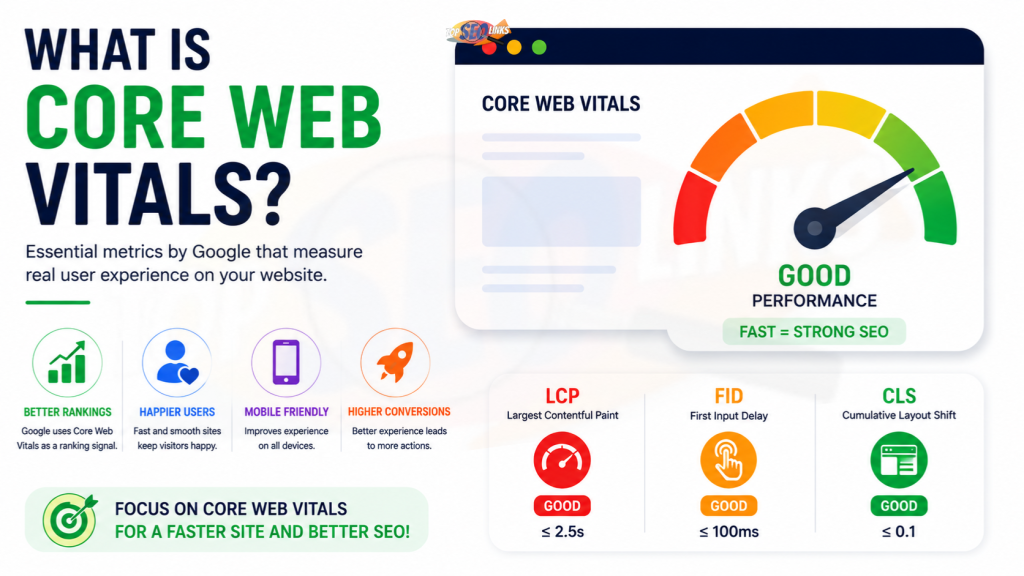
What is Core Web Vitals? Core Web Vitals are important website performance signals that show how users feel when they open and use a webpage. They check if the page loads fast, responds quickly when someone clicks, and stays stable while loading. In simple words, Core Web Vitals help you understand whether your website is fast, smooth, and easy to use.
Core Web Vitals mainly include three metrics: LCP, INP, and CLS. Google’s Core Web Vitals tools measure loading, responsiveness, and visual stability for pages.
At Topseolinks.com, we help businesses improve Core Web Vitals, page speed, technical SEO, and website performance so users and search engines can understand the website better.
Want expert SEO help for your website? Start with our special offer: Free SEO for 1st Month
Why Core Web Vitals Matter for Your Website
Core Web Vitals matter because people do not like slow, jumpy, or confusing websites. When a page loads fast and works smoothly, visitors can read, click, shop, fill forms, and contact your business without frustration.
A website may have good content, but if it loads slowly or moves around while loading, users may leave. This can reduce leads, sales, traffic value, and trust.
Core Web Vitals help website owners understand real user experience. They are not only about speed scores. They are about how your website feels to real visitors.
Core Web Vitals matter because they help you check:
- How fast the main content appears
- How quickly the page responds after a click or tap
- Whether the page layout moves unexpectedly
- Whether users can browse smoothly on mobile
- Whether your website feels professional and trustworthy
- Whether technical problems are hurting user experience
Google says Core Web Vitals are recommended for success with Google Search and are part of page experience guidance, but they are not the only ranking factor. Helpful content and overall page quality still matter.
For a related topic, you can also read How Page Speed Affects SEO
What Are the Three Core Web Vitals?
Core Web Vitals are made of three main measurements. Each one checks a different part of the page experience.
| Core Web Vital | Full Form | What It Measures | Good Score |
|---|---|---|---|
| LCP | Largest Contentful Paint | How fast the main content loads | 2.5 seconds or less |
| INP | Interaction to Next Paint | How quickly the page responds to user actions | 200 milliseconds or less |
| CLS | Cumulative Layout Shift | How stable the page layout is while loading | 0.1 or less |
Google’s current Core Web Vitals are LCP, INP, and CLS. Web.dev also explains that these are the three Core Web Vitals metrics and provides the common threshold ranges.
LCP: Largest Contentful Paint
LCP stands for Largest Contentful Paint. It measures how long it takes for the main content on a page to appear.
Think of it like opening a book. If the main page appears quickly, you can start reading. If it takes too long, you may close the book and pick another one.
On a website, the largest content may be:
- A big banner image
- A large heading
- A main product image
- A large text block
- A hero section
- A featured image
A good LCP means users can see the main part of your page quickly.
Why LCP Is Important
LCP is important because visitors want to see useful content fast. If the main content takes too long to appear, users may feel the website is slow.
Poor LCP can happen because of:
- Large images
- Slow hosting
- Heavy website design
- Too much JavaScript
- Unoptimized CSS
- Slow server response
- Large background images
- Too many third-party scripts
How to Improve LCP
You can improve LCP by making the main content load faster.
Helpful fixes include:
- Compress large images
- Use proper image sizes
- Improve hosting quality
- Use caching
- Remove unnecessary scripts
- Optimize CSS
- Use faster image formats
- Avoid very heavy hero sections
- Load important content first
For example, if your homepage has a huge banner image, it may slow down LCP. Making that image lighter can help the page feel faster.
INP: Interaction to Next Paint
INP stands for Interaction to Next Paint. It measures how quickly a page responds when a user interacts with it.
Interaction means actions like:
- Clicking a button
- Opening a menu
- Typing in a form
- Tapping a link
- Selecting a filter
- Adding a product to cart
- Using a search box
If a user clicks a button and the page responds quickly, the experience feels smooth. If the page freezes or delays, the user may feel annoyed.
Why INP Is Important
INP is important because a website should not only load fast; it should also work fast after loading.
For example, imagine a user opens your contact page. The page loads, but when they click the form field, it takes too long to respond. That creates a poor experience.
Poor INP can happen because of:
- Heavy JavaScript
- Too many plugins
- Slow browser processing
- Large page builders
- Heavy tracking scripts
- Complex animations
- Poorly optimized forms
- Third-party tools
How to Improve INP
To improve INP, your website should respond faster to user actions.
Helpful fixes include:
- Reduce unnecessary JavaScript
- Remove unused plugins
- Delay non-important scripts
- Optimize form scripts
- Avoid heavy animations
- Keep page design simple
- Split long JavaScript tasks
- Remove tools that slow user actions
- Test menus, buttons, and forms
INP is very important for ecommerce websites, service websites, booking pages, and lead generation forms because users must click and interact smoothly.
CLS: Cumulative Layout Shift
CLS stands for Cumulative Layout Shift. It measures how much the page moves while loading.
Have you ever tried to click a button, but suddenly an image loaded and pushed the button down? That is layout shift.
A stable page means the content stays in place while loading. A jumpy page feels confusing and can make users click the wrong thing.
Why CLS Is Important
CLS is important because users want a stable page. If text, images, buttons, or ads move suddenly, visitors may feel frustrated.
Poor CLS can happen because of:
- Images without fixed size
- Ads loading late
- Fonts changing after loading
- Popups pushing content down
- Videos without proper space
- Banners appearing suddenly
- Dynamic content loading late
How to Improve CLS
To improve CLS, make sure page elements have space reserved before they load.
Helpful fixes include:
- Set image width and height
- Reserve space for ads
- Avoid sudden popups
- Load fonts properly
- Avoid moving banners
- Keep page layout simple
- Add fixed space for videos
- Test pages on mobile and desktop
A stable website feels more professional and easier to use.
Core Web Vitals and SEO
Core Web Vitals can affect SEO because they are connected to page experience. Search engines want users to find helpful pages, and user experience is part of that.
But Core Web Vitals are not magic ranking buttons. A website with poor content will not rank only because it is fast. A website needs helpful content, proper keywords, good structure, technical SEO, backlinks, trust, and user-friendly design.
Core Web Vitals support SEO by improving:
- User experience
- Mobile performance
- Page loading
- Interaction speed
- Layout stability
- Website trust
- Conversion chances
- Technical SEO health
If your content is useful and your website also performs well, your SEO foundation becomes stronger.
For deeper technical understanding, you can read What is Technical SEO
Core Web Vitals and Mobile Users
Core Web Vitals are very important for mobile users. Many visitors open websites from phones, and mobile internet may not always be fast.
A website may feel okay on a desktop but slow on mobile. This can happen because mobile devices have smaller screens, weaker processors, and sometimes slower internet.
Mobile Core Web Vitals problems include:
- Large images loading slowly
- Buttons responding late
- Menus opening slowly
- Content jumping while loading
- Popups covering content
- Forms becoming difficult to use
- Product pages loading slowly
- Checkout pages feeling heavy
A mobile-friendly website should load fast, respond quickly, and stay stable.
Common Core Web Vitals Problems and Fixes
| Problem | Metric Affected | Why It Happens | Simple Fix |
|---|---|---|---|
| Large banner image | LCP | Main image takes too long to load | Compress and resize the image |
| Slow hosting | LCP | Server responds slowly | Use better hosting |
| Heavy JavaScript | INP | Browser takes too long to respond | Reduce or delay scripts |
| Too many plugins | INP/LCP | Extra files slow the page | Remove unused plugins |
| Images without size | CLS | Page jumps when images load | Add image width and height |
| Late-loading ads | CLS | Ads push content down | Reserve ad space |
| Heavy sliders | LCP/INP | Large scripts and images load | Use lighter design |
| Too many fonts | LCP/CLS | Fonts load late and shift text | Use fewer fonts |
| Redirect chains | LCP | Browser moves between URLs | Clean redirects |
| Large CSS files | LCP | Design files block loading | Remove unused CSS |
How to Check Core Web Vitals
You should check Core Web Vitals regularly because website performance can change over time.
A page may become slower when you add:
- New images
- New plugins
- New tracking tools
- New design elements
- New popups
- New fonts
- New product pages
- New scripts
Google Search Console
Google Search Console has a Core Web Vitals report. It shows groups of URLs with good, needs improvement, or poor performance. Google recommends checking the Core Web Vitals report in Search Console to understand how pages perform.
This is helpful because it shows performance based on real user data.
PageSpeed Insights
PageSpeed Insights can test a page and show performance details. It gives suggestions for improving speed and Core Web Vitals.
You can check:
- LCP
- INP
- CLS
- Mobile performance
- Desktop performance
- Image issues
- Script issues
- CSS problems
- Server response problems
Lighthouse
Lighthouse is useful for lab testing. It checks a page in a controlled test environment and gives improvement suggestions.
Lab data is useful for testing, but real user data is also important because real visitors use different devices, internet speeds, and locations.
Chrome User Experience Report
The Chrome User Experience Report, also called CrUX, uses real-world user experience data from Chrome users. This helps website owners understand how users actually experience pages.
How to Improve Core Web Vitals Step by Step
Improving Core Web Vitals should be done carefully. Do not guess. First test, then fix the biggest problems.
Step 1: Test Important Pages First
Do not only test the homepage.
Check pages that matter most, such as:
- Homepage
- Service pages
- Product pages
- Category pages
- Contact page
- Landing pages
- Blog posts
- Checkout page
If a service page brings leads, it should load fast and work smoothly.
Step 2: Fix Large Images
Large images often hurt LCP.
To fix image problems:
- Compress images before uploading
- Use correct image size
- Avoid very large banners
- Use modern image formats when possible
- Add lazy loading for below-the-fold images
- Remove unused images
- Use image dimensions
Images should look clear but not be too heavy.
Step 3: Improve Hosting and Server Response
A slow server can delay the whole page.
Better hosting can improve:
- Server response time
- Page loading
- Stability
- Uptime
- Mobile performance
- User experience
If hosting is poor, other speed fixes may not be enough.
Step 4: Reduce JavaScript
Heavy JavaScript can hurt INP. If the browser is busy processing scripts, it cannot respond quickly to user actions.
To reduce JavaScript problems:
- Remove unused scripts
- Remove unused plugins
- Delay non-important scripts
- Avoid too many tracking tools
- Use lighter forms and menus
- Reduce animation scripts
- Test important buttons and forms
Step 5: Fix Layout Shifts
Layout shifts hurt CLS.
To reduce layout shifts:
- Set image sizes
- Reserve space for ads
- Avoid sudden popups
- Load fonts properly
- Avoid inserting banners above content
- Reserve video space
- Test mobile layout
A stable page gives users more confidence.
Step 6: Use Caching
Caching helps pages load faster by saving website files.
Caching can improve:
- Repeat visits
- Static file loading
- Server performance
- Page speed
- LCP
Caching is useful for blogs, service websites, ecommerce stores, and business websites.
Step 7: Clean Website Design
A beautiful website should also be fast. Heavy designs can hurt Core Web Vitals.
Avoid:
- Large background videos
- Too many animations
- Heavy sliders
- Too many popups
- Too many fonts
- Large image galleries
- Complex page sections
Topseolinks.com offers Web Design Solutions that focus on clean layout, user experience, speed, and SEO-friendly structure.
Step 8: Monitor After Every Major Change
Core Web Vitals can change when your website changes.
Check performance after:
- Website redesign
- Theme update
- Plugin update
- Hosting change
- New tracking code
- New landing page
- New ecommerce feature
- Image upload
- Website migration
Regular checks help protect your SEO performance.
Core Web Vitals Checklist
| Task | Helps Improve | Priority |
|---|---|---|
| Compress large images | LCP | High |
| Improve hosting | LCP | High |
| Remove unused JavaScript | INP | High |
| Remove unnecessary plugins | LCP/INP | High |
| Set image dimensions | CLS | High |
| Reserve ad space | CLS | Medium |
| Use caching | LCP | High |
| Optimize fonts | LCP/CLS | Medium |
| Reduce heavy sliders | LCP/INP | Medium |
| Test mobile pages | All metrics | High |
| Clean CSS | LCP | Medium |
| Monitor Search Console | All metrics | High |
Core Web Vitals for Ecommerce Websites
Ecommerce websites need strong Core Web Vitals because buyers expect a smooth shopping experience.
An ecommerce site may have:
- Product images
- Category pages
- Filters
- Cart pages
- Checkout pages
- Payment tools
- Reviews
- Product recommendations
- Tracking tools
All these features can slow down a website if they are not managed well.
Important ecommerce pages to test include:
- Product pages
- Category pages
- Cart page
- Checkout page
- Search result pages
- Homepage
- Offer landing pages
If product pages are slow, users may not see products quickly. If checkout is slow, buyers may abandon the cart. If filters respond slowly, users may stop shopping.
Core Web Vitals for Business Websites
Business websites need good Core Web Vitals because visitors often want quick answers.
They may want to know:
- What services you offer
- How to contact you
- Your pricing
- Your location
- Your reviews
- Your process
- Why they should choose you
If your service page loads slowly or the contact form responds late, you may lose leads.
For business websites, the most important pages to optimize are:
- Homepage
- Service pages
- Contact page
- Landing pages
- Location pages
- Blog posts
- Pricing page
- About page
Topseolinks.com helps businesses improve these pages through expert SEO Services, technical SEO audits, performance improvements, and user experience planning.
Core Web Vitals Mistakes to Avoid
Core Web Vitals optimization can go wrong if done without planning.
Only Testing the Homepage : Your homepage may be fast, but your service pages, product pages, or blog posts may be slow. Test important pages separately.
Ignoring Mobile Performance : Mobile users are very important. Always check mobile Core Web Vitals, not just desktop scores.
Using Too Many Plugins : Too many plugins can add extra scripts, CSS, database load, and tracking files.
Compressing Images Too Much : Images should be light, but they should still look clear. Blurry images can reduce trust.
Removing Important Scripts Without Testing : Some scripts are needed for forms, menus, cart, checkout, or tracking. Removing them carelessly can break your site.
Not Checking After Redesign : Website redesigns can change Core Web Vitals. Always test before and after launch.
Focusing Only on Scores : Scores matter, but real user experience matters more. A page should be fast, useful, clear, and easy to use.
How Topseolinks.com Helps Improve Core Web Vitals
Core Web Vitals can feel technical, but Topseolinks.com makes the process easier for businesses.
We check your website, find the real problems, and improve performance step by step.
1. We Audit Your Website Performance
We review important pages and check speed, loading, layout stability, mobile performance, scripts, images, hosting, and technical SEO issues.
2. We Find the Main Problem
One website may have poor LCP because of images. Another may have poor INP because of scripts. Another may have poor CLS because of layout shifts.
We find the cause before applying fixes.
3. We Optimize Important Pages First
We focus on pages that bring traffic, leads, or sales.
These may include:
- Homepage
- Service pages
- Product pages
- Category pages
- Blog posts
- Contact page
- Landing pages
4. We Improve SEO and User Experience Together
Core Web Vitals are not only about technical scores. They are about real users.
Topseolinks.com improves website performance in a way that supports SEO, user experience, conversions, and business growth.
5. We Help You Maintain Website Health
A website can become slow again over time. New plugins, images, scripts, or design changes can affect Core Web Vitals.
Topseolinks.com helps businesses monitor and maintain website performance regularly.
Build a Faster and Smoother Website Experience
Core Web Vitals help you understand how users experience your website. They check if the page loads fast, responds quickly, and stays stable while loading.
The three main Core Web Vitals are:
- LCP for loading speed
- INP for interaction speed
- CLS for layout stability
A website with good Core Web Vitals can give users a better experience, support SEO performance, improve mobile browsing, and increase trust. A website with poor Core Web Vitals may feel slow, jumpy, and frustrating.
At Topseolinks.com, we help businesses improve Core Web Vitals through technical SEO audits, speed optimization, web design improvements, image optimization, script cleanup, and long-term performance support.
Ready to improve your Core Web Vitals and website SEO? Contact Us
FAQs
What is Core Web Vitals?
Core Web Vitals are website performance metrics that measure user experience. They check how fast the main content loads, how quickly the page responds to user actions, and how stable the layout is while loading.
What are the three Core Web Vitals?
The three Core Web Vitals are LCP, INP, and CLS. LCP measures loading speed, INP measures responsiveness, and CLS measures layout stability.
Why are Core Web Vitals important for SEO?
Core Web Vitals are important for SEO because they are connected to page experience. A fast, smooth, and stable website can give users a better experience and support stronger SEO performance.
What is a good LCP score?
A good LCP score is 2.5 seconds or less. This means the main content of the page loads quickly for users.
What is a good INP score?
A good INP score is 200 milliseconds or less. This means the page responds quickly when a user clicks, taps, or interacts with it.
What is a good CLS score?
A good CLS score is 0.1 or less. This means the page layout stays stable and does not jump around while loading.
How can I improve Core Web Vitals?
You can improve Core Web Vitals by compressing images, improving hosting, reducing JavaScript, using caching, fixing layout shifts, optimizing fonts, cleaning code, and testing mobile performance.
Can Topseolinks.com help improve Core Web Vitals?
Yes. Topseolinks.com can audit your website, find Core Web Vitals issues, improve page speed, fix technical SEO problems, optimize important pages, and help create a better user experience.