
When Should Noindex Be Used?
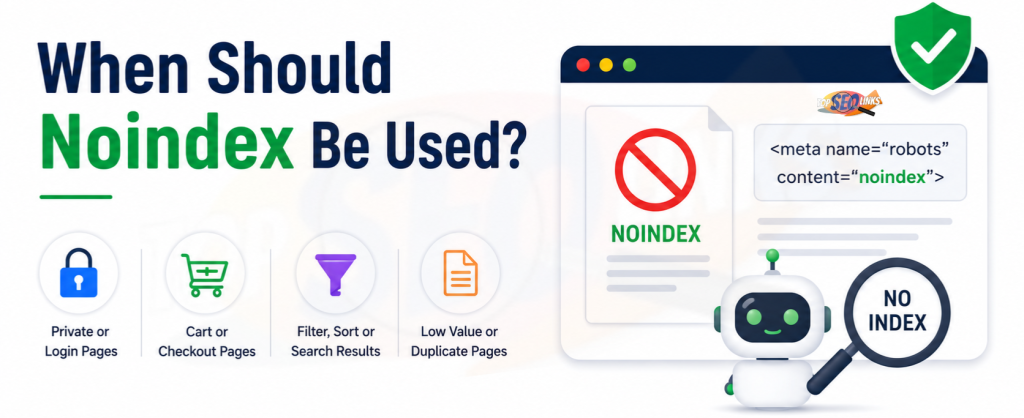
When Should Noindex Be Used? Noindex should be used when a page is useful for your website visitors but should not appear in Google or other search engine results. A noindex tag tells search engines not to show a page in search results. This is helpful for pages like thank-you pages, login pages, cart pages, checkout pages, internal search result pages, thin pages, duplicate pages, and test pages.
Noindex is a powerful SEO tool, but it must be used carefully. If you add noindex to the wrong page, that page may stop appearing in search results. Google explains that noindex can be used through a robots meta tag or an X-Robots-Tag HTTP header to stop a page from appearing in search results.
At Topseolinks.com, we help businesses use noindex correctly so low-value pages stay out of search results and important pages stay visible for traffic, leads, and sales.
Want expert SEO help for your website? Start with our special offer: Free SEO for 1st Month
What Does Noindex Mean?
Noindex means “do not index this page.”
In simple words, it tells search engines: “Please do not show this page in search results.”
Search engines like Google have a big list of web pages. This list is called an index. When someone searches on Google, Google shows pages from this index. If a page has a noindex tag, search engines should not keep that page in their search index after they crawl and process it.
A simple noindex tag looks like this: <meta name=”robots” content=”noindex”>
This code is usually placed in the head section of a webpage.
Noindex does not delete the page from your website. The page can still exist. People can still open the page if they have the direct link. But the page should not appear in search results once search engines understand the noindex instruction.
For example, your thank-you page may still open after someone fills out a form. But it does not need to rank on Google.
Why Noindex Is Important for SEO
Noindex is important because every page on your website does not need to appear in Google.
A good website may have many pages, but only some pages are useful for search visitors. Your homepage, service pages, product pages, blog posts, category pages, and landing pages may bring organic traffic. These pages should usually be indexable.
But some pages are only useful after a visitor takes an action. Some pages are private. Some pages are repeated. Some pages are too thin. These pages may not help your SEO if they appear in search results.
Noindex helps you keep your website clean for search engines.
It can help with:
- Keeping low-quality pages out of Google
- Avoiding duplicate content problems
- Reducing thin content in search results
- Protecting private or unnecessary pages from search visibility
- Helping search engines focus on important pages
- Improving the quality of indexed pages
- Making technical SEO easier to manage
For better understanding of how search engines store pages, you can read What is Indexing in SEO?
How Noindex Works
Noindex works when search engines can crawl the page and read the noindex instruction.
Here is the simple process:
- Search engine bot visits your page.
- It reads the page code or HTTP header.
- It finds the noindex instruction.
- It understands that the page should not be shown in search results.
- The page is removed from the index or not added to the index.
This is why the page should not be blocked from crawling if you want Google to see the noindex tag. MDN explains that a crawler needs to access a resource to read meta elements or headers.
This is a common mistake. Many website owners block a page in robots.txt and also add noindex. But if Google cannot crawl the page, it may not see the noindex tag.
So remember this simple rule:
Noindex controls whether a page appears in search results. Robots.txt controls whether search engines can crawl a page.
When Should Noindex Be Used on a Website?
Noindex should be used when a page has a purpose for users but does not need to rank in search results.
This means the page can stay on your website, but it should not be visible in Google search.
1. Use Noindex for Thank-You Pages
Thank-you pages are one of the most common pages that should be noindexed.
A thank-you page appears after a user completes an action, such as:
- Filling out a contact form
- Downloading a file
- Buying a product
- Signing up for a newsletter
- Booking a consultation
- Sending an inquiry
Example:
/thank-you/This page is useful because it confirms that the action is complete. But it does not need to appear in Google.
If a thank-you page appears in search results, people may land on it without completing the required action. This can create tracking issues and poor user experience.
2. Use Noindex for Login Pages
Login pages are useful for existing users, not for search traffic.
Examples:
/login/
/my-account/
/user-login/
A login page does not need to rank on Google because it does not provide useful information for new search visitors. It is only a doorway for users who already have an account.
If login pages appear in search results, they may create unnecessary index clutter.
3. Use Noindex for Cart and Checkout Pages
Cart and checkout pages should usually be noindexed.
Examples:
/cart/
/checkout/
/payment/
These pages are part of the buying process. They are not meant to attract organic traffic.
A cart page may change based on the user. A checkout page may include personal buying steps. These pages should not appear in search results.
For ecommerce websites, noindex is very helpful because stores often have many user journey pages that should not be indexed.
4. Use Noindex for Internal Search Result Pages
Internal search result pages are pages created when someone searches inside your website.
Example:
/?s=seo+tips
/search?q=shoes
These pages can create many low-value URLs. If Google indexes them, your website may end up with hundreds or thousands of weak pages.
Internal search result pages often repeat content from other pages. They may also show thin results or no results at all.
That is why many websites use noindex for internal search result pages.
5. Use Noindex for Thin Content Pages
Thin content means a page has very little useful information.
Examples:
- A tag page with only one post
- A category page with no description
- A short page with almost no helpful content
- A placeholder page
- A page with only one image and no explanation
- A page created automatically by a CMS
If a thin page does not help users and cannot be improved soon, noindex may be useful.
But noindex should not always be the first choice. If the page is important, it is better to improve the content instead of hiding it.
6. Use Noindex for Duplicate Pages
Duplicate pages have the same or very similar content.
Examples:
- Printer-friendly versions
- Tracking URL versions
- Filter pages with similar content
- Tag pages repeating blog posts
- Product variation pages with the same description
- Old landing pages copied from new pages
Noindex can help when a duplicate page should not appear in search results.
But sometimes a canonical tag is better than noindex. If you want search engines to understand the main version of a duplicate page, canonical can be useful. If you want the page fully removed from search results, noindex can help.
7. Use Noindex for Staging and Test Pages
Staging pages are used for testing a website before it goes live.
Examples:
staging.example.com
dev.example.com
test.example.com
These pages should not appear in search results because they may contain unfinished content, duplicate content, broken layouts, or test information.
Noindex should be used on staging pages. But after the final website goes live, make sure noindex is removed from the live pages.
This is a very important step because many websites lose traffic after launch when developers forget to remove noindex.
8. Use Noindex for Admin and Private Pages
Admin pages and private pages should not appear in search results.
Examples:
- Admin login pages
- User profile pages
- Account setting pages
- Private dashboard pages
- Download confirmation pages
- Temporary access pages
These pages are not useful for general search users. They may also contain private or sensitive actions.
Noindex helps keep them out of search results.
9. Use Noindex for Filter Pages With No SEO Value
Ecommerce and listing websites often have filter pages.
Examples:
/shoes?color=red
/shoes?size=9
/products?sort=price-low
Some filter pages are useful for SEO if they target real search demand. For example, “black running shoes” may deserve its own optimized page.
But many filter pages are not useful for Google. They may create endless combinations and duplicate content.
Noindex can be used for filter pages that do not have unique SEO value.
10. Use Noindex for Old Campaign Pages
Old campaign pages may not be useful after the campaign ends.
Examples:
- Old sale pages
- Expired offer pages
- Old event pages
- Past webinar pages
- Seasonal landing pages with no current value
If the page has no traffic, no backlinks, and no future use, noindex may help. But if the page has backlinks or traffic, a redirect or content update may be better.
Pages That Usually Need Noindex
| Page Type | Should Noindex Be Used? | Reason |
|---|---|---|
| Thank-you page | Yes | It is only useful after a user completes an action |
| Login page | Yes | It is for existing users, not search visitors |
| Cart page | Yes | It is part of the buying process |
| Checkout page | Yes | It should not appear in search results |
| Internal search results | Usually yes | These pages can create many thin URLs |
| Staging page | Yes | It is not meant for public search |
| Main service page | No | It should bring search traffic and leads |
| Product page | Usually no | It can attract buyers from Google |
| Important blog post | No | It can rank and bring organic traffic |
| Duplicate filter page | Often yes | It may not have unique search value |
When You Should Not Use Noindex
Noindex can help SEO, but wrong use can hurt your website badly.
You should not use noindex on pages that you want to rank.
1. Do Not Use Noindex on Your Homepage
Your homepage is one of the most important pages on your website. It helps users and search engines understand your brand.
If your homepage has noindex, it may disappear from search results.
2. Do Not Use Noindex on Main Service Pages
Service pages are important for business leads.
Examples:
- SEO services page
- Web design page
- PPC services page
- Digital marketing services page
These pages should usually be indexed because they help customers find your business.
If your service page is not appearing in Google, one reason may be a wrong noindex tag.
At Topseolinks.com, our SEO Services include technical checks to find wrong noindex tags and other indexing problems.
3. Do Not Use Noindex on Important Blog Posts
Blog posts can bring traffic, answer customer questions, and build trust.
If a blog post targets a useful keyword, do not noindex it.
Instead, improve the blog with better content, headings, examples, FAQs, and internal links.
4. Do Not Use Noindex on Product Pages That Should Rank
Product pages are important for ecommerce websites.
A product page should not be noindexed if:
- It targets buyer keywords
- It has unique content
- It has search demand
- It gets traffic
- It has backlinks
- It brings sales
If the product is out of stock temporarily, do not rush to noindex it. You may update the page, show alternatives, or keep it indexable if the product will return.
5. Do Not Use Noindex on Pages With Backlinks Without Checking
If a page has backlinks, it may have SEO value.
Before noindexing it, check:
- Does the page get traffic?
- Does it have backlinks?
- Does it rank for keywords?
- Is there a better page to redirect it to?
- Can the content be improved?
Sometimes redirecting is better than noindexing.
6. Do Not Use Noindex Instead of Fixing Content
Noindex is not a shortcut for every weak page.
If a page is important but thin, improve it.
Add:
- Better explanation
- Helpful examples
- Original details
- FAQs
- Images
- Tables
- Use cases
- Clear answers
- Strong page structure
If the page has business value, make it better instead of hiding it.
Noindex vs Robots.txt vs Canonical
Many website owners get confused between noindex, robots.txt, and canonical tags. These tools are related to SEO, but they do different jobs.
Noindex :
Noindex tells search engines not to show a page in search results. Use it when a page should exist but should not rank.
Robots.txt
Robots.txt tells search engines whether they are allowed to crawl a page or folder. Use it when you want to control crawling, not indexing.
But if you want Google to see a noindex tag, do not block the page with robots.txt before Google can read it.
Canonical Tag
A canonical tag tells search engines which page is the main version when similar or duplicate pages exist. Use canonical when you want to guide search engines to a preferred page.
Simple Difference
| SEO Tool | What It Does | Best Use Case |
|---|---|---|
| Noindex | Stops a page from appearing in search results | Thank-you pages, login pages, thin pages, private pages |
| Robots.txt | Controls whether search engines can crawl a page | Blocking crawl paths, admin areas, unnecessary files |
| Canonical tag | Shows the preferred version of similar pages | Duplicate product pages, similar URLs, tracking versions |
| 301 redirect | Sends users and search engines to another URL | Old pages, moved pages, deleted duplicate pages |
How to Decide If a Page Needs Noindex
Before adding noindex, ask simple questions.
Does the Page Help Search Visitors?
If someone finds this page on Google, will it help them?
If yes, do not noindex it.
If no, noindex may be useful.
Does the Page Target a Keyword?
If the page is made to target an important keyword, it should usually be indexed.
For example, a page about services, products, or useful blog information should stay indexable.
Does the Page Bring Traffic or Leads?
Check if the page gets traffic or leads.
If it does, be careful. Noindex can remove the page from search results and reduce traffic.
Is the Page Duplicate or Thin?
If the page is duplicate, thin, or low value, noindex may help. But also consider whether you should improve, merge, redirect, or canonicalize it.
Is the Page Private or Action-Based?
If the page appears after an action, like a thank-you page or checkout page, noindex is usually a good idea.
Is the Page in Your Sitemap?
Your XML sitemap should usually include important indexable pages. If a page is noindexed, it should usually not stay in your main sitemap for a long time.
How to Add Noindex Correctly
There are two common ways to add noindex.
Meta Robots Tag
This is the most common method for normal webpages.
Example: <meta name=”robots” content=”noindex”>
This tag goes inside the head section of the page.
X-Robots-Tag Header
This method is used in HTTP headers. It can be helpful for non-HTML files like PDFs and other resources. MDN explains that X-Robots-Tag is a response header used to define how crawlers should index URLs.
Example: X-Robots-Tag: noindex
This method usually needs developer or server-level support.
How to Check If Noindex Is Working
After adding noindex, you should check if it is working correctly.
Check Page Source
Open the page. Right-click and choose “View Page Source.” Search for: noindex
If you find the robots meta tag, the page has a noindex instruction.
Use Google Search Console
Google Search Console can help you check indexing status.
You may see:
- Excluded by ‘noindex’ tag
- URL is not on Google
- Page is not indexed
This helps you confirm whether Google has seen the noindex instruction.
Use SEO Audit Tools
SEO audit tools can scan many pages and show which pages have noindex.
This is helpful for larger websites because checking pages one by one takes too much time.
Check After Website Launch
After a new website launch or redesign, always check noindex tags.
Many websites accidentally keep noindex from staging mode. This can stop important pages from appearing in Google.
Common Noindex Mistakes
Noindex mistakes can hurt rankings and traffic. Here are the biggest mistakes to avoid.
Mistake 1: Noindexing Important Pages
This can happen by accident through CMS settings, SEO plugins, theme settings, or developer code.
Always check important pages like:
- Homepage
- Service pages
- Product pages
- Blog posts
- Category pages
- Landing pages
- Location pages
Mistake 2: Blocking the Page in Robots.txt
If you block a page in robots.txt, search engines may not crawl it and may not see the noindex tag.
If you want noindex to work, allow search engines to access the page so they can read the instruction.
Mistake 3: Using Noindex on Pages That Need Canonical
If two pages are similar, canonical may be better than noindex.
For example, if a product appears in two categories, canonical can show the preferred product URL. Noindex may remove one version from search results, but canonical can help connect signals to the main page.
Mistake 4: Keeping Noindex in Sitemap
A sitemap should guide search engines to important pages you want indexed.
If your sitemap includes many noindexed URLs, it sends mixed signals.
Mistake 5: Forgetting to Remove Noindex After Testing
This is common during website redesigns. Developers may add noindex to the test site. After launch, they forget to remove it.
This can cause major ranking loss.
How Topseolinks.com Helps With Noindex Decisions
Noindex looks simple, but it can become confusing on real websites. A website may have hundreds or thousands of pages. Some should be indexed, some should be noindexed, some should be redirected, and some should use canonical tags.
Topseolinks.com helps businesses make the right decision.
1. We Audit Your Indexed and Noindexed Pages
We check which pages are visible in search results and which pages are blocked from indexing. This helps us find mistakes and missed opportunities.
2. We Find Pages That Should Be Noindexed
We identify low-value pages, duplicate pages, thin pages, internal search pages, thank-you pages, staging pages, and private pages that should not appear in search results.
3. We Find Important Pages Noindexed by Mistake
Sometimes important pages have noindex because of plugin settings, website redesigns, or coding mistakes. We help find and fix these issues.
4. We Improve Technical SEO
Noindex is part of technical SEO. It connects with crawling, indexing, canonical tags, redirects, XML sitemaps, robots.txt, and internal linking.
To understand this better, you can also read What is Technical SEO?
5. We Help You Build a Cleaner SEO Structure
A clean website helps search engines understand which pages matter most. Topseolinks.com helps you keep important pages indexable and unnecessary pages out of search results.
For long-term SEO support, you can Hire Dedicated SEO Expert from Topseolinks.com to manage indexing, technical SEO, content issues, and ranking improvements.
Simple Noindex Checklist
Use this checklist before adding noindex:
- Is this page useful for search visitors?
- Does this page target an important keyword?
- Does this page bring organic traffic?
- Does this page have backlinks?
- Is this page a thank-you, login, cart, or checkout page?
- Is this page thin or duplicate?
- Is this page only for testing?
- Should this page be improved instead of noindexed?
- Should this page use canonical instead?
- Should this page be redirected instead?
- Is this page blocked in robots.txt?
- Is this page listed in the sitemap?
- Have you checked it in Google Search Console?
Use noindex only when the answer is clear.
Best Practices for Using Noindex
Noindex should be used with planning, not guessing.
- Keep Important Pages Indexable : Your business pages, ranking blogs, useful guides, and product pages should usually stay indexable.
- Use Noindex for Pages With No Search Value : Pages like thank-you pages, login pages, cart pages, and internal search pages usually do not need to rank.
- Do Not Add Noindex Sitewide : Never add noindex to the whole website unless the website is private, under development, or not ready for search.
- Review Noindex Tags Regularly : Website settings can change. Plugins can update. Developers can make changes. Regular SEO checks help prevent mistakes.
- Check Google Search Console : Google Search Console helps you see if pages are excluded by noindex. Check it regularly after changes.
- Keep Your Sitemap Clean : Your sitemap should mostly contain pages you want search engines to index.
- Use Noindex With a Clear Goal : Every noindex tag should have a reason. Do not add it just because a page looks unimportant. Review the page first.
Build a Cleaner Search Presence With the Right Noindex Use
Noindex should be used when a page should stay on your website but should not appear in search results. It is useful for thank-you pages, login pages, checkout pages, cart pages, internal search pages, thin pages, duplicate pages, test pages, and private pages.
But noindex should not be used on important pages that bring traffic, rankings, leads, or sales. If used incorrectly, it can hide valuable pages from Google.
The goal is simple: keep useful SEO pages visible and keep low-value pages out of search results.
At Topseolinks.com, we help businesses make smart noindex decisions through technical SEO audits, indexing checks, content reviews, sitemap cleanup, and long-term SEO planning. Our team can help you protect important pages and clean up pages that should not appear in search results.
Ready to fix indexing issues and improve your website SEO? Contact Us
FAQs
When should noindex be used?
Noindex should be used when a page is useful for website visitors but should not appear in search results. Examples include thank-you pages, login pages, cart pages, checkout pages, internal search result pages, thin pages, duplicate pages, and staging pages.
Should I use noindex on important SEO pages?
No, you should not use noindex on important SEO pages. Pages like your homepage, service pages, product pages, useful blog posts, and main landing pages should usually stay indexable because they can bring traffic, leads, and sales.
Is noindex good for duplicate content?
Noindex can help with some duplicate content pages, but it is not always the best solution. Sometimes a canonical tag, redirect, or content improvement is better. The right choice depends on the purpose of the page.
Can noindex hurt SEO?
Yes, noindex can hurt SEO if it is added to important pages by mistake. If a valuable page has noindex, it may stop appearing in search results and lose organic traffic.
Is noindex the same as robots.txt?
No, noindex and robots.txt are different. Noindex tells search engines not to show a page in search results. Robots.txt controls whether search engines can crawl a page or folder.
How do I check if a page has noindex?
You can check the page source and search for “noindex.” You can also use Google Search Console or SEO audit tools to find pages with noindex tags.
Should thank-you pages be noindexed?
Yes, thank-you pages should usually be noindexed. They are only useful after a user completes an action, such as filling out a form or making a purchase. They do not need to appear in search results.
Can Topseolinks.com help fix noindex issues?
Yes. Topseolinks.com can audit your website, find wrong noindex tags, identify pages that should be noindexed, fix indexing problems, clean your sitemap, and improve your technical SEO structure.